Revit vs. ArchiCAD: Advanced Customization and Interoperability for Complex Projects
The rise of BIM within the AEC industry has led to simpler times in terms of coordination, planning, and time management. Its advanced software features automate the production of plans, reports, and design processes, and it offers real-time collaboration and documentation, helping engineers, architects, and designers at all stages of the design process.
Revit and ArchiCAD, both popular choices and powerful tools for creating detailed 3D models, each, have their approaches to advanced customization and interoperability that differ significantly. Understanding these differences is crucial for professionals selecting the right software for their projects.
Revit and BIM
Developed by Autodesk and introduced as a leading BIM modeling software, Revit has greatly established itself through the AEC industry. It has grown to become the go-to BIM solution owing to its parametric modeling and coordination tools. The software provides for all construction processes with its comprehensive tools from architectural designing to 3D modeling to plumbing designs and fixtures to produce detailed BIM models.
ArchiCAD and BIM
GraphiSoft developed ArchiCAD and is well-known in the industry for its user-friendly interface, innovative approach, and toolset that emphasises design, visualisation, and documentation. This BIM package that provides an enhanced workflow, ArchiCAD allows for optimised project handling and delivery.
BIM in Customisation and Interoperability
Integrating various tools and design processes, BIM plays a central role in customization and interoperability. While it enables users to tailor their workflows and meet specific requirements, there are various software that enhance these processes. Both Revit and ArchiCAD offer features that enhance customization and facilitate seamless collaboration with other software.
Features of Revit and ArchiCAD
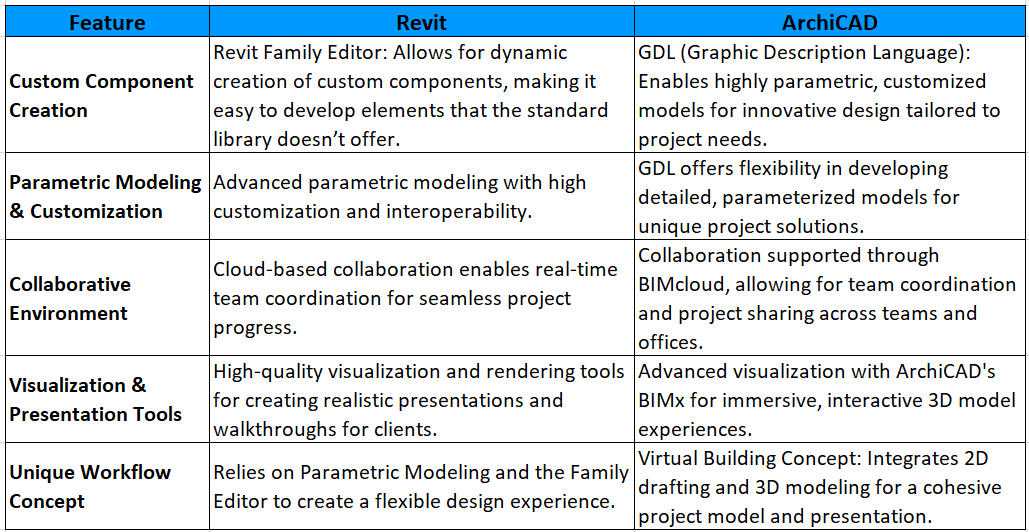
Revit Vs ArchiCAD
Customisation
Dynamo enables Revit users to automate tasks and create custom workflows through a visual programming interface, allowing for custom scripts that extend Revit's functionality.
The robust API allows for deeper integration and customisation by creating custom tools and plugins tailored to specific workflows and project requirements.
Apart from GDL, Python API powerfully develops complex scripts and enables users to automate tasks and create custom tools to enhance ArchiCAD capabilities. While the software also supports Grasshopper and Rhino which are integrated tools for specific parametric workflows, it enhances creative architectural solutions.
Both Revit and ArchiCAD offer rich features, but the choice depends on project needs. Revit, though less customizable, excels with tools like Family Editor and Dynamo, while ArchiCAD stands out with GDL and Python API.
Interoperability
Revit integrates seamlessly with AutoCAD and other CAD software, supporting multiple file formats like IFC, DWG, DXF, RVT, and RFA. This compatibility enhances communication and coordination across tools like AutoCAD and NavisWorks, making it ideal for firms within the Autodesk ecosystem to improve efficiency.
While ArchiCAD’s interoperability is not as extensive as Revit's, it can still import and export IFC files, DWGs, and DXFs. This helps facilitate smooth collaboration between other BIM tools for larger projects. ArchiCAD's user-friendly interface is equipped with helpful collaborative tools that help architects and designers share models easily and ensure everyone is up-to-date.
In terms of the breadth of file formats, Revit leads, though ArchiCAD offers a good range of interoperability, it focuses on design and documentation.
Comparison of Customization and Interoperability

Workflow
Considering the workflow and efficiency of every project, the choice between Revit and ArchiCAD can significantly impact project workflows. Revit’s integration within the Autodesk ecosystem can streamline processes for teams already using these tools, while ArchiCAD’s design-centric approach may benefit projects focused on architectural creativity.
Revit and ArchiCAD each offer unique strengths within the BIM ecosystem. Revit’s integration within the Autodesk environment suits complex, engineering-heavy projects, while ArchiCAD’s design-focused tools provide flexibility for creative architectural work. The choice depends on specific project needs, team workflows, and the existing software setup.
Looking to enhance your design and BIM workflows? nCircle Tech specializes in Autodesk Forge-based solutions tailored to the AEC industry. Connect with us to explore how our technology can optimize project efficiency and collaboration. Let’s bring your vision to life!