From AI-Powered to Deployment-Ready: Why Testing Matters for AEC Applications
AI can now build you a working app before your coffee gets cold. That's the good news. The less glamorous news: "it runs" and "it's ready" are two very different sentences, and in construction, the gap between them has a habit of showing up on site.
AI-powered applications are changing how AEC teams solve workflow problems. BIM managers, VDC leads and project engineers can describe what they need and get a functional tool in hours. But a tool that works in a demo isn't the same as one you can trust with live project data. Testing is what closes that gap.
A Working Demo isn't a Working Application
A demo proves the happy path: clean sample data, one user, ideal conditions. Real projects offer none of those. Data arrives incomplete, naming conventions drift between teams, and the person using the app at 6 a.m. on a site is rarely the person who built it.
AI-powered software is especially good at looking finished. Buttons click, tables fill, charts render. What the interface can't tell you is whether the logic underneath holds up. That's what testing is for.
Why AEC Raises the Stakes
In many industries, a buggy app is an annoyance. In AEC, the output feeds decisions about what gets fabricated, ordered and built. A few ways it goes wrong:
- Domain misunderstandings: A tool that treats an RFI like a submittal, or ignores level of development, can produce results that look right and are subtly wrong.
- Quiet calculation errors: Unit mismatches, tolerance assumptions and rounding rules rarely crash an app. They just produce confident, wrong numbers.
- Stale or partial data: An app fed by an outdated export can report the wrong status with total conviction.
- Access gaps: Without tested permissions, the wrong person may see cost or bid information.
- Subtly wrong data in a spreadsheet: Subtly wrong data in the field is rework and can be quite the headache.
What "Tested" Actually Means
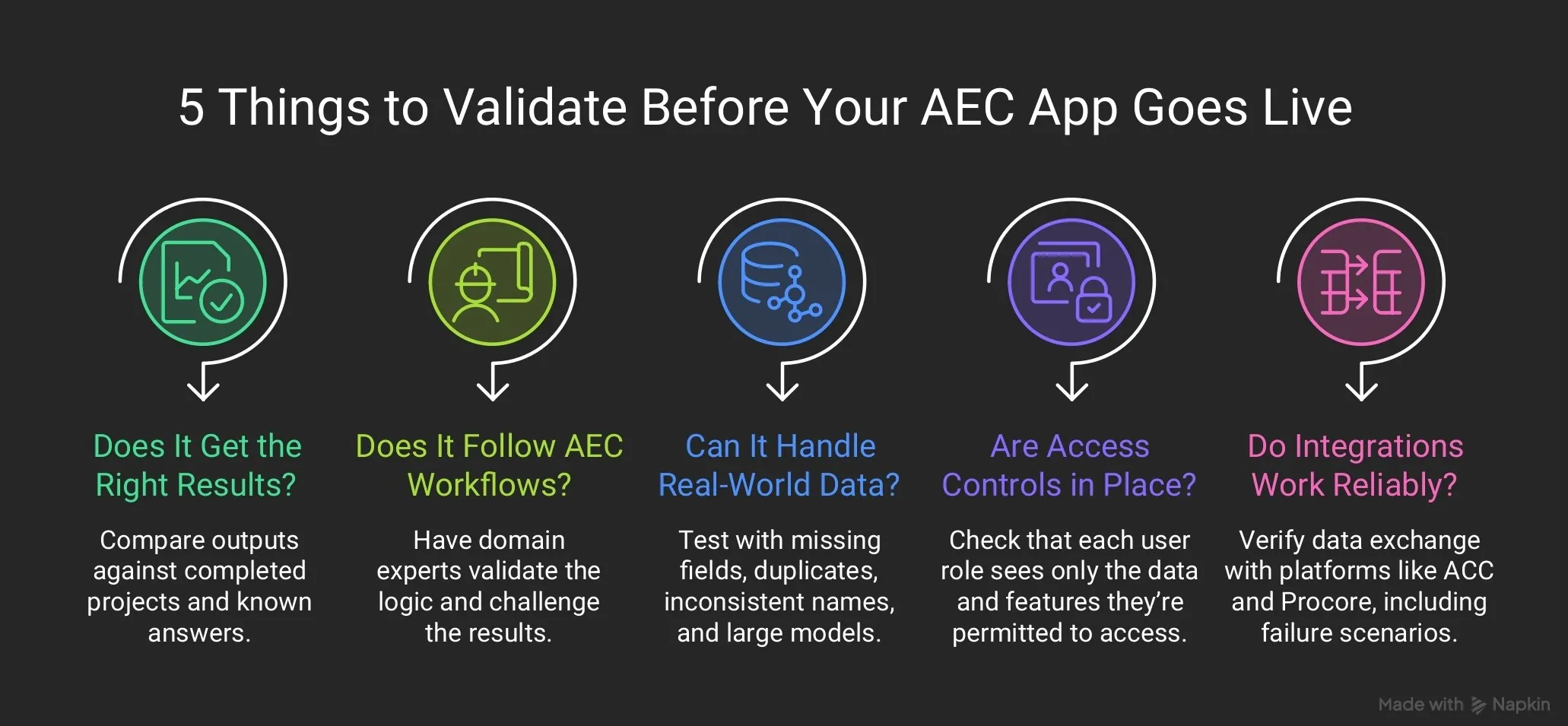
Testing an AEC application isn't about running it once and nodding. Five checks cover most of the risk:
1. Accuracy against known answers:
Run the app on a past project where you already know the right outcome. If it disagrees with reality, reality wins.
2. Domain logic:
Ask someone who knows the workflow to try to break it. The person who wrote the prompt is the worst person to test the result.
3. Messy, real-world data:
Feed it blank fields, duplicate entries, odd naming and oversized models. Projects are never as tidy as sample files.
4. Permissions and access:
Sign in as each role and confirm everyone sees what they should, and nothing more.
5. Integrations:
Confirm that live connections to systems like Autodesk Construction Cloud or Procore pull the right data, and fail gracefully when they can't.
Testing is a Team Sport
The domain expert knows whether the output makes sense. IT knows whether the app is safe to run. Neither can do the other's job, and neither check is optional.
The expert validates the logic: are the priorities, calculations and workflows correct? IT validates the foundations: where it's hosted, how people sign in, where data goes and who maintains it. When both sign off, a prototype becomes an application.
Build Testing Into the Path, Not Onto the End
Testing that's bolted on at the end is the first thing skipped when a deadline tightens. A better pattern is a built-in path: experts build and test freely in a sandbox, and nothing reaches the live environment until it's been reviewed and approved.
That's the thinking behind nVibe, nCircle Tech's AI application platform for AEC. Users describe the app they need in plain language, in their own language, and AEC context is built in. nVibe can run on cloud, private cloud or on-prem (all hosting options are open) under their own AI governance. Domain experts build and test in a sandbox; nothing reaches production without IT approval, and every change is audit-logged. You get the speed of AI building without skipping the part that keeps it safe.
A Pre-launch Checklist
Before any AI-built app goes live, ask:
• Has it been tested on a past project with known results?
• Has a domain expert tried to break it?
• Does it handle incomplete and messy data?
• Do role-based permissions work as intended?
• Do integrations pull current data from the right source?
• Has IT approved it, and does someone own its maintenance?
If any answer is "not yet," it's still a prototype. That's fine. Just don't hand it the keys to the project.
The Bottom Line
AI has made building apps fast. It hasn't made trusting them automatic. In AEC, where a small error can travel all the way to the field, testing is what turns a clever demo into a dependable tool. The firms that get the most from AI won't be the ones that build fastest.
They'll be the ones that build, test, and deploy with confidence.
Ready to take AI-built apps from prototype to production?
See how nVibe makes it possible
Explore getnvibe.ai.
Frequently Asked Questions
1. Why does testing matter for AI-powered AEC applications?
An AI-built app can look finished while its logic is wrong. In AEC, small errors in calculations, data or domain rules can reach fabrication and site decisions. Testing confirms the app is accurate, secure and reliable before it touches live project data.
2. What makes an AI-built app deployment-ready?
A deployment-ready app has been tested on real, messy data, checked for role-based permissions, and approved by IT. It also has a named owner for maintenance. A prototype that only works in a demo hasn’t met these conditions.
3. How do you test integrations with tools like Autodesk Construction Cloud or Procore?
Check that the live connection pulls current data from the right source, matches the records in the source system, and fails gracefully when the connection drops. Avoid relying on manually exported spreadsheets, which go stale quickly.
4. How should Revit plugins built with AI be tested?
Run the plugin on real project models, including large, messy and incomplete ones, and compare its output with a project where you already know the right result. Have a BIM expert try to break it before it reaches the wider team.
5. Who should test an AI-powered application?
A domain expert, such as a BIM manager or VDC lead, should validate the logic and outputs, while IT validates security, hosting and access. The person who built the app shouldn’t be its only tester.
6. How does nVibe support safe deployment?
nVibe is nCircle Tech’s AI application platform for AEC, covering both web apps and Revit plugins. Apps run on infrastructure the customer controls, either nVibe’s managed cloud or their own private VPC, under governance rules their IT team sets.