AI-Powered Assistants for AEC — Practical Intelligence for Real Construction Work

Clarity where projects get complex.


Construction teams don't struggle because they lack data. They struggle because critical information is scattered across systems, buried in files, and locked behind time-consuming workflows. nCircle Tech builds AI-powered assistants for AEC that give project teams direct access to live project intelligence integrated inside Autodesk Construction Cloud and the tools your teams already use every day. These are not generic chatbots. They are adaptive systems built around how construction projects are actually delivered from site teams managing RFIs and submittals, to portfolio leaders tracking performance across programmes.

How nCircle's AI-Powered AEC Assistant Works

ACC Data Connection

The assistant connects to your Autodesk Construction Cloud environment via a secure API integration, pulling live project data including issues, RFIs, submittals, drawings, forms, and schedule information.

Natural Language Query

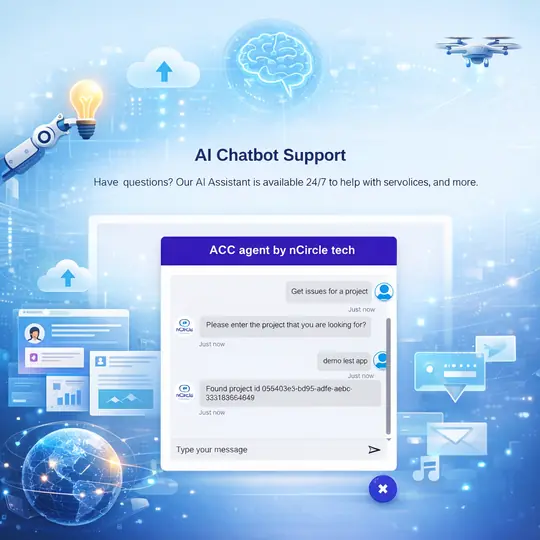
Team members ask questions in plain English — from site phones, tablets, or desktop. No training required. The NLP engine interprets the intent and maps it to the relevant data query.

Real-Time Project Intelligence

The assistant queries live ACC data and returns a contextual answer, summary, or alert — surfacing patterns, flagging risks, or retrieving specific documents within seconds.

Reporting & Portfolio View

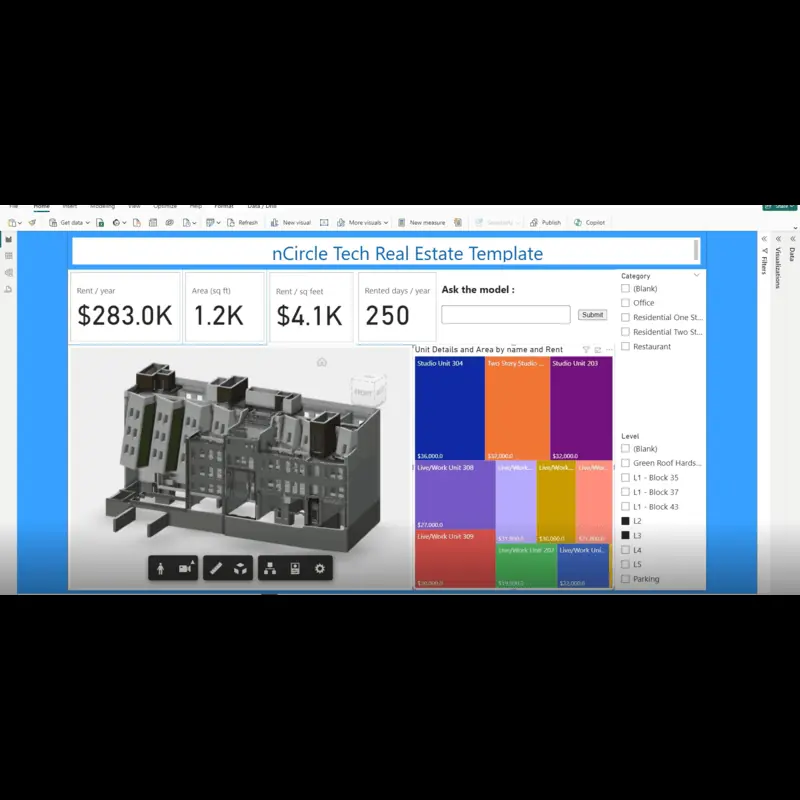
For leadership, the Power BI integration aggregates insights across projects — enabling portfolio-level performance monitoring, trend analysis, and executive reporting without manual data assembly.

ACC AI Assistant — Live Project Intelligence Inside Autodesk Construction Cloud

The nCircle ACC AI Assistant is integrated directly into Autodesk Construction Cloud and works with live project data — not cached snapshots or static exports. It allows teams to ask practical questions in plain English and receive clear, contextual responses without navigating complex screens, running manual queries, or exporting data to spreadsheets.

Issue Tracking & RFI Management
• Query issues by location, trade, priority, assignee, or status instantly
• Summarise open issues and highlight key dependencies and blockers
• Identify recurring issues and patterns that indicate coordination risk
• Generate shareable issue summaries for coordination meetings and site reports
• Track overdue RFIs and submittals with automatic priority flagging
Document & Drawing Access
• Access related drawings, photos, and documents from a single query
• Retrieve the latest revision of any document without manual navigation
• Cross-reference issues with the drawings and specifications they relate to
• Surface submittal status and linked review comments in one response
Construction Reporting Software Integration
• Generate project status summaries on demand in plain language
• Produce consistent progress reports from live ACC data
• Flag cost variances, schedule risks, and quality issues automatically
• Export structured data directly to Power BI for portfolio-level analysis

Autodesk Assistant vs nCircle ACC AI Assistant — What is the Difference

Both tools use AI. But they solve different problems for different users. Here is the practical distinction:


As project-level insight becomes clearer and more accessible, organisations are ready to take the next step gaining visibility and intelligence across multiple projects through the portfolio layer. 

AI-Enabled Power BI Dashboard for AEC - From Project Insight to Portfolio Understanding

Project teams need operational detail. Leadership needs strategic perspective. The nCircle Power BI Assistant bridges both extending ACC intelligence to portfolio-level analysis across projects, regions, and time periods. It connects Autodesk Construction Cloud data to Power BI and enables teams to interact with that data using natural language questions. 


Rather than waiting for complex BI models or manually prepared static reports, teams ask focused questions and receive concise, decision-ready insights reducing time spent on data preparation and improving confidence in the metrics used for executive decisions. 


What the Power BI Assistant Delivers


For Project Teams 

  • Real-time KPI tracking across active projects 
  • Risk, delay, and cost variance flagging 
  • Cross-project coordination performance 
  • Issue and submittal resolution rates 


For Portfolio Leadership 

  • Portfolio-level performance visibility 
  • Programme trend analysis and forecasting 
  • Multi-project risk and compliance overview 
  • Executive-ready reports without manual assembly


By linking project intelligence with portfolio oversight, organisations gain end-to-end visibility from site activity to board-level decision-making — through a single integrated platform.

Case Studies

Testimonials

Frequently Asked Questions

What does an AI-powered assistant for construction actually do?
An AI-powered assistant for construction integrates with your project management platform - nCircle Tech's ACC AI Assistant connects directly to Autodesk Construction Cloud and allows site teams, project managers, and leadership to ask plain-English questions and receive real-time project answers. It automates RFI tracking, summarises open issues, retrieves documents, flags risks, and generates reports replacing manual navigation of complex project management interfaces with a conversational, context-aware tool built around how construction teams actually work
How is the nCircle ACC AI Assistant different from Autodesk's built-in assistant?
Autodesk's assistant answers questions about how to use the software it draws on product documentation and help content. nCircle's ACC AI Assistant answers questions about what is happening on your actual project it draws on live ACC project data including issues, RFIs, submittals, drawings, and schedule information. The nCircle assistant proactively surfaces risks, identifies recurring patterns, and generates decision-ready summaries. It is a project intelligence tool, not a software navigation guide.
Does the ACC AI Assistant require separate software installation?
No. The nCircle ACC AI Assistant is integrated directly into Autodesk Construction Cloud and operates within the workflows your teams already use. There is no separate application to install, no new platform to learn, and no data export required. The assistant accesses live project data through the ACC API integration and is accessible from desktop or mobile devices on site or in the office.
Can the AI assistant handle RFI tracking and submittal management?
Yes, RFI tracking and submittal management are among the most direct use cases for the nCircle ACC AI Assistant. Teams can query open and overdue RFIs by trade, location, assignee, or priority in plain English. The assistant returns current status, flags overdue items, identifies dependency blockers, and generates shareable summaries for coordination meetings replacing the manual process of filtering through issue registers and chasing status updates across email and spreadsheets.
How does the Power BI Assistant complement the ACC AI Assistant?
The Power BI Assistant extends the ACC AI Assistant's project-level intelligence to the portfolio level. While the ACC assistant answers questions about individual projects, the Power BI Assistant aggregates data across multiple projects, regions, and time periods enabling portfolio managers and executives to ask cross-project performance questions, track programme-wide KPIs, and identify trends without waiting for manually prepared reports.
What kind of AEC organisations does this solution suit?
The nCircle ACC AI Assistant is best suited for AEC organisations that are already using Autodesk Construction Cloud and managing medium-to-large project portfolios where manual data navigation creates bottlenecks. Typical users include general contractors, specialist subcontractors, project management consultancies, and owner organisations managing capital programmes. For organisations considering ACC adoption or migration, nCircle Tech's ACC implementation and migration services provide the foundation before deploying the AI assistant layer.

See Where AI Can Realistically Improve Outcomes Across Your Projects

Discuss your current ACC usage, reporting challenges, and where AI can deliver measurable value — from site teams to leadership. No generic demos. A focused conversation about your specific project environment.