
Top 10 Tips That Can Take Your ArchiCAD Projects From Ordinary to Extraordinary
Holistic design isn’t about using every tool available. Instead, it’s about handpicking the right ones to simplify and comprehensively build on your conceived vision. With the BIM market projected to grow to USD 15 billion by 2028 from USD 7.9 billion in 2023, adopting tools with BIM workflows has become necessary.
This is where ArchiCAD walks in!
Planning, designing, constructing, and handling– ArchiCAD lets you enhance the workflow and add an extra layer of project handling and workspace optimization.
The best part?
It’s all within a single platform.
Whether you’re a beginner or even if you’ve had your fair share of ArchiCAD experimentation, here are the ten pro tips that will help you ace your projects.
Top 10 Game-changing ArchiCAD Tips
1. Instead of Taking on a New Endeavour, Pick Up an Old Project
Don’t jump to a new project. Instead, pick up an old one for a learning experience. It keeps your mind focused on ArchiCAD's tools and techniques by taking away worries about design and detail.
Through this approach, you can lay the groundwork for your future work. Thus, ensure that you make a wise choice when choosing the project. Go with a project you know inside-out, and you’re comfortable with.
Before exploring ArchiCAD, show your project to an ArchiCAD expert to seek their assistance.
2. Everyone’s Go-to: Youtube Tutorials

YouTube does much more than playing your favourite clips or songs. It’s a goldmine for learning, especially while gaining complete software control. Why not enjoy easily accessible and comprehensively detailed tutorials?
Subscribing to YouTube channels makes it exciting to learn new tips and tricks through videos. You can practically perform the command step-by-step to enhance the understanding.
3. Your Workspaces Should Align with Your Preferences
Don’t we all love working in ‘our way?’ Whether it's the work desks or ArchiCAD workspace, it must align with your preferences to maximize productivity. You can begin customizing from the template itself.
Pick a template, set standards, working units, dimensions, scale, etc. Through the Workspace scheme, you can even personalize the toolbar and palette. You can show or hide the palettes, tab bar, quick options bar, and toolbars, among other things. Customized workspaces make the tools more accessible, accelerating your pace and efficiency by reducing the time spent searching for appropriate tools.
4. Make Keyboard Shortcuts Your Best Friends
Designing is about quality, but execution is more about speed and precision. And don’t keyboard shortcuts make working quicker? Be it a simple Ctrl+C and Ctrl+V or Ctrl+Z– keyboard shortcuts can be your best friends while working in ArchiCAD.
Here are a few of the top-used shortcuts.

5. How Cool are Hotlinks?
When it comes to an AEC project, working on a single piece of software seems impossible, as it involves a multitude of tasks. At some point, there will arise a need to add content from the external file to your ArchiCAD file. And that’s where Hotlinks come in.
Hotlink Modules lets you integrate the content seamlessly in the open Project (host). You can even manage the repetition of structures or elements like identical hotel rooms. Place the room as a Hotlink module, and modifications in a single block will be reflected everywhere by updating the source file.
6. Smart Work Over Hard Work with Libraries
 Graphisoft
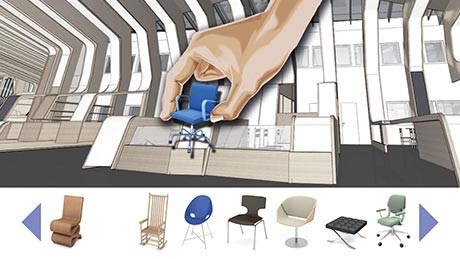
One of the most crucial aspects of efficient working is organising and managing libraries. You can create and save repetitive elements like furniture, doors, windows, etc. ArchiCAD objects are parametric, allowing you to tailor the colour, sizes, and other parameters based on best fit.
BIMcloud Libraries ensure uniformity throughout the project. When working with different stakeholders, keep a centralised library on the BIMcloud Server to make it accessible to all.
7. Manage Layers to Simplify Learning
You can create a real mess by not working in the layers. Layers help differentiate between elements by grouping them based on similarities. For example, electrical fixtures, dimensions, furniture, walls, etc., can be added to common layers.
With defined layers, management becomes more straightforward. You can show or hide, lock or unlock, define 3D view mode, etc., for the selected layer. While ArchiCAD has a predefined set of layers, you can also create more layers.
8. A Model Like You’re Actually Building
While you’re modelling on ArchiCAD, think like a builder. Consider the virtual model as an actual project to comprehensively understand the nitty-gritty involved. This will help you define the nits and create a holistic work report.
Along with the report-making and precise project estimation, this approach will help you anticipate potential risks and issues to optimise the design.
9. Leverage ArchiCAD Templates for Enhanced Understanding
One secret to boosting your project’s efficiency is designing a customised template file. Maintain a base template file rather than recreate the title block from scratch every time.
Design your template by adding schedules, views, materials, and other customizations your project demands.
10. Use the Free ArchiCAD Resources Spread Across the Internet
The internet is home to free ArchiCAD resources, where you can try out free tools and connect with professionals to have your queries solved. Rather than reinventing the wheel, make sure to use the tons of ArchiCAD content that is available online.
You can even visit the Graphisoft Community page, where like-minded professionals share their insights, ask questions, and connect. Make sure to embrace this invaluable resource for continuous learning.
Understand, Learn, Apply!
Working with ArchiCAD is more about developing a strategy than simply cramming the tools. It’s the art of learning commonly used shortcuts, crafting your workspace in your style, and working smart with libraries and online references.
At nCircle Tech, we aim to innovate in every possible way. We offer custom materials, seamless transfer of geometry and parameters from Revit to ArchiCAD and a seamless CAD-BIM workflow. To learn more about our automation and plugin services, visit at https://ncircletech.