BIM vs CAD in Construction: What's the Difference?
People often try to compare BIM and CAD. They even say they are part of one another. BIM includes CAD as part of its system. But using BIM is also using the ‘computer’s aid’ to design. So, how is BIM and CAD related in construction, and what is the difference between CAD and BIM?
Let's find out.
What is CAD?

PD Solutions
As the name suggests, Computer-Aided Design (CAD) is the design and rendering of 2D drawings or 3D models using digital applications.
CAD has applications in many industries— product, manufacturing, engineering, jewellery design etc. The architecture industry uses CAD to ideate, design, draft and visualise.
What is BIM?
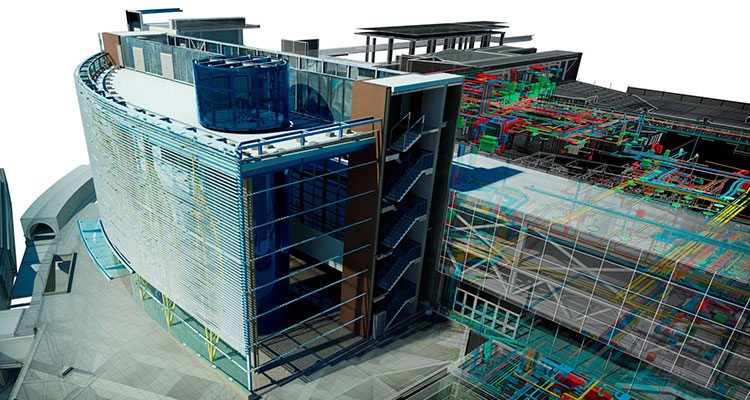
BIM stands for Building Information Modelling/Management. It is a working methodology that relies on a ‘single source of truth’. BIM stores all data as a 3D model, making it accessible to all the disciplines involved in building construction and operations.
BIM vs. CAD in Construction: How do they compare?

Simply put, CAD and BIM might depict similar things but they operate in completely different ways. Let's take Autodesk AutoCAD vs. Autodesk Revit for example. If you select a ‘wall’ in AutoCAD software is a set of two parallel lines. The same lines could be used to depict many different things.
In a BIM model in Revit if you select a ‘wall’ you have many different parameters available– height, thickness, material, etc. The wall would have clean junctions and openings, with doors and windows placed in them.
Long story short, CAD is mostly 2D. Yes, 3D modelling is also CAD but most of the industry uses them for 2D ‘renderings’. CAD focuses on drawings and graphics. BIM focuses on the building model itself, shared as it is with the different stakeholders. If you need any drawings, they can be easily obtained from the model.

GovDesignHub
Advantages of using CAD
- More convenient than hand-drafting and physical model-making.
- Offers all 2D and 3D modelling facilities for many different disciplines.
- Offers design documentation and analysis tools.
- Virtual simulation allows design enhancement and better project development.
Advantages of using BIM
- Developed specifically to streamline the AEC industry workflows.
- Can do everything that CAD does and more– for the building industry.
- Puts all your documentation in a single database for seamless collaboration.
- Allows for integration of 4D (Time) and 5D (Cost) in the same 3D model.
Disadvantages of using CAD
- The versatile tool palette leads to many tasks being performed manually.
- It only understands geometry; doesn’t detect practical issues that arise during construction.
Disadvantages of using BIM
- Until BIM is adopted all throughout the AEC industry, seamless collaboration is not possible.
- Lack of experts and experienced professionals in using BIM, as it is a new technology.
- Although the RoI is good, BIM demands a significant capital investment to be set up.
BIM or CAD: What Should I Use?

GlobalCAD
CAD is a versatile tool used all the way from the industrial design of aeroplanes to iPhones. The AEC industry also relies heavily on CAD systems as integral parts of their workflow.
BIM, on the other hand, is a construction industry exclusive. With collaborative features, clash detection, and integration of schedules and estimates, BIM is becoming the new industry standard.
CAD or BIM: Which is the Best Choice?

ADMEC Multimedia Institute
CAD offers a diverse range of applications, while BIM is focused only on building design and construction. That being said, it is difficult to beat the efficiency of BIM in construction.
With model-based project scheduling, estimates, and real-time collaboration, BIM is perfect for the AEC industry. The technology includes enough information to be able to predict the life cycle of a building before it is even built.
What’s in store for CAD and BIM in 2023
The latest technology such as automation and AI/ML is bringing a new revolution to the industry. In both CAD and BIM workflows in construction, automation saves time which can be better utilised in critical thinking.
nCircle provides customised solutions for the automation of CAD and BIM workflows. We use the latest technology to optimise your CAD or BIM workflows using the power of AI/ML. Our expert team provides extensive insight and efficient services to automate CAD and BIM processes, streamline workflows and improve collaboration.
FAQs: BIM vs CAD in the Construction Industry
Which is better CAD or BIM?
BIM has a better advantage over CAD as it provides much more information. More information in a well-managed store means a better building outcome!
Is BIM replacing CAD?
CAD disrupted the AEC industry by digitizing drafting and visualisation. Now BIM has brought a revolution in collaborative workflows and model-based scheduling.
Is CAD considered BIM?
CAD isn’t BIM itself, but it is a facilitator. The drawings produced by CAD systems are integral to the BIM workflow.
Is 3D CAD the same as BIM?
3D CAD is usually only a physical representation of the building. It is devoid of information about a building such as materials and services.
Why BIM is more powerful than CAD?
BIM includes most of the CAD features, but many more of its own. For instance, BIM allows the prefabrication of building components ahead of time.
What are the disadvantages of BIM?
Incompatibility: The use and knowledge of BIM is unevenly distributed among the industry.
Legal: Legal ramifications of BIM are still being explored.
Cost: The software and setup for BIM require significant investment.
Lack of Experts: Only a limited number of experts work in the field, BIM being relatively young.